Seamless Patterns of Paper Snowflakes: A Versatile Design Resource for the Holiday Season
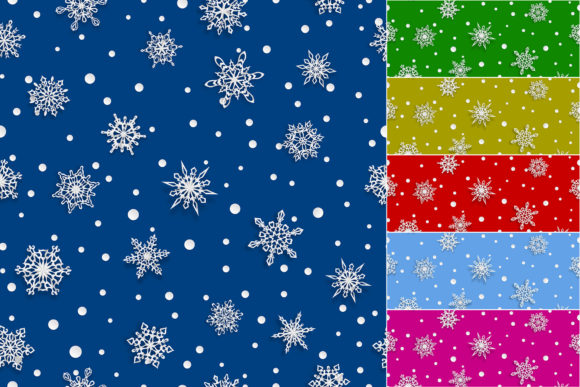
There is something about paper snowflakes that pulls at a memory from childhood—folding a square of white paper, snipping tiny triangles, and unfolding it to reveal something delicate and unique. That same charm carries through into digital design, and that is where Seamless Patterns of Paper Snowflakes steps in. This is a collection of repeating backgrounds that capture the look of real paper snowflakes, complete with soft shadows, across a palette of festive colours. Whether you are putting together a brand campaign, wrapping a product, or just trying to make your holiday content feel warmer, these patterns can save you hours of manual work.
Small business owners who want festive branding without the fuss
If you run a boutique, a café, or a pop-up market stall, the holiday season is likely your busiest stretch. You need packaging, signage, social media posts, and maybe even a wee gift tag for every order. Digging into Seamless Patterns of Paper Snowflakes gives you access to six colour variations out of the box—red, green, blue, yellow, purple, and light blue. That means you can pick one colour for your wrapping paper and another for your Instagram story background, and everything still belongs to the same visual family.
For a local coffee shop, imagine using the green seamless pattern as a background for a loyalty card promotion. Pair it with a handwritten-style font, and the card feels both nostalgic and modern. The soft shadows on the snowflakes add depth so the design does not look flat when printed on matte card stock. If you have ever tried to create a repeating pattern from scratch in design software, you know how tedious alignment can be. These files skip that headache entirely.
One thing worth noting: the set includes both vector EPS files and high-resolution JPGs at 4167 by 4167 pixels. If you are ordering short-run packaging from a local printer, the JPGs should be more than enough. But if your printer asks for vector artwork, you have the EPS 10 files ready to go. That flexibility matters when you are working with different vendors and tight timelines.
Digital creators and social media managers searching for seasonal cohesion
During December, every second post on a brand’s feed seems to demand a holiday touch. Yet creating fresh backgrounds for each day can eat into your creative energy fast. Seamless Patterns of Paper Snowflakes works as a reliable go-to for story backgrounds, carousel slides, and even Pinterest pins. Because the pattern repeats perfectly, you can scale it across different canvas sizes without worrying about awkward seams.
Let us say you manage a lifestyle account that posts daily gift guides. You could assign a different colour to each category—red for gift ideas under twenty dollars, blue for stocking stuffers, purple for last-minute finds. The pattern stays constant, so followers start to recognise the visual cue. Over the course of a month, that subtle consistency builds a stronger brand identity than scattering random festive graphics across your feed.
Light blue is often overlooked in holiday design, but it can be a breath of fresh air if your audience is tired of the same old red and green. A soft ice-blue background with white paper snowflakes reads as wintery without screaming Christmas, which works well for brands that want to acknowledge the season without leaning too heavily on traditional symbols.
Print projects that call for a repeatable design with character
When it comes to physical printing, a seamless pattern is only as good as its resolution and its edges. At 4167 by 4167 pixels, each JPG gives you a square tile that can cover a decent area—think wrapping paper for a medium-sized gift box, or the liner for a set of holiday gift bags. If you are printing larger rolls, you can tile the pattern in your layout software and the repeat will be invisible, provided your printer aligns the tiles properly.
Greeting cards are another natural fit. A folded card with a full-bleed pattern on the front and a blank interior gives you a custom look without needing to illustrate anything new. Add a simple message like “Warm wishes” in a dark font over the light blue variant, and the printed card feels like something from a boutique stationery shop. For anyone making cards to sell at craft fairs, having six colour options means you can offer variety without spending hours designing each one.
Yellow is the boldest of the set, and it works surprisingly well for kids’ holiday activities or classroom take-home projects. A yellow background with soft white snowflakes feels cheerful and playful, a little less formal than the deep red or green. If you are printing activity sheets for a children’s holiday party, that splash of colour can make the page more inviting before a child even reads the instructions.
Event planners and party decor enthusiasts looking for quick backgrounds
Hosting a holiday gathering often means decorating on a budget and with limited time. Digital patterns are not just for screens and print—they can be used to create banners, table runners, or even large-format posters if you have access to a wide-format printer. The vector EPS files are especially handy here because you can scale the pattern up to poster size without losing sharpness. That soft shadow detail that looks subtle on a phone screen becomes a tactile visual element on a large print, giving the decor a layered, almost dimensional feel.
For a winter wedding with a Christmas theme, the light blue or purple patterns could serve as a backdrop for a welcome sign or a photo booth backdrop. Purple adds a bit of richness that blends well with silver or gold accessories. The seamless nature of the pattern means you can crop it to any shape—round, arched, heart—and still get a continuous design without weird cut-offs.
Event planners often need mockups quickly to show clients. Drop the pattern into a digital frame mockup, and you can present a near-final look in minutes. That speed can be the difference between landing a client who wants to see options fast and losing them to indecision.
Website and blog design that deserves a festive refresh
Changing your entire website theme for the holidays is overkill. Swapping a background pattern, a hero section texture, or a newsletter sign-up backdrop is enough to signal the season. Seamless Patterns of Paper Snowflakes works well as a subtle overlay if you lower the opacity in your CSS or design software. The soft shadows add a hint of texture that pure flat shapes lack.
Bloggers who post holiday recipes, gift guides, or DIY tutorials can use these patterns as featured image backgrounds. Instead of photographing each recipe against a busy countertop, place a bowl of cookies on a clean surface and add the pattern as a background in post-production. The pattern stays consistent across posts, and readers start associating that visual style with your holiday content. If you ever want to flip back to a previous year’s posts, the pattern makes those archives easy to spot.
For paid ad creatives, the contrast between a bold pattern and a simple product shot can improve click-through rates. Test a red background for a holiday sale ad and a blue one for a winter clearance—small changes in background colour can shift how an audience perceives the urgency or tone of the offer.
DIY and craft enthusiasts who love mixing digital with physical
Not everyone who buys these patterns uses them straight out of the file. Crafters often print patterns on sticker paper, cut them out, and assemble layered decorations. The separate snowflake shapes embedded in the seamless design can be isolated if you open the EPS file in Illustrator or Affinity, letting you resize or recolour individual flakes for ornaments, gift toppers, or scrapbook elements.
If you make handmade ornaments to sell on Etsy, printing the pattern on translucent vellum and backing it with a plain colour creates a layered ornament that catches light. The soft shadows that come built into the pattern add depth even on transparent material, so you do not need to fake a shadow effect later.
Scrapbooking during the holidays becomes faster when you have a full-page background ready to go. Instead of pasting multiple smaller elements, lay a 12x12 inch print of the pattern behind your photos and embellishments. The pattern does the heavy lifting, and you just add a few stickers or journaling on top.
Educators and program coordinators making holiday materials engaging
A classroom or community centre programme rarely has a dedicated design budget. But a single purchase of Seamless Patterns of Paper Snowflakes gives you enough variety to cover everything from bulletin boards to worksheet borders to parent newsletters. The high-resolution JPGs can be inserted directly into Word or Google Docs, so you do not need expensive software to use them.
For a holiday bazaar pack, use the green pattern as the cover sheet and the yellow pattern for internal coupon pages. Students helping to organise the event can colour-code their materials without needing to create new art. The soft shadow effect on the snowflakes also helps visually differentiate sections when printed in black and white—the shades of grey still carry a sense of texture, which is a practical advantage if colour printing is not available.
Common considerations before choosing or using these patterns
While the set offers six colours, there is no white-only or transparent background variant in the JPG files. If you need to layer the pattern over a coloured base or a photograph, the EPS route is better because you can edit the shapes directly. That said, the JPGs have a solid background, which works fine for most print and digital uses where you want the pattern to sit on its own.
The 4167-pixel square is generous, but if you are printing a large banner that spans several feet, you will want to use the vector files to avoid pixellation. Vector is also the way to go if you want to change the colour of the snowflakes themselves, since the EPS 10 format allows you to recolor each element independently.
One limitation to keep in mind: the patterns are designed as seamless tiles, but the coordination of multiple colours requires you to open separate files. There is no single file that contains all colour variations on one canvas. For most users, this is not a problem—you pick the colour you need and work with that file. But if you need to quickly switch colours within the same layout, you will need to load each file separately.
The soft shadows that give these patterns their tactile quality also mean they work best on backgrounds that are not too busy. Layering them over a heavily patterned or photographic background can make the shadows look muddy. Stick to solid colours or gentle gradients behind the pattern, and the snowflakes will pop the way they are intended to.
Strengths worth noticing
What makes this set stand out from generic snowflake clip art is the paper texture and shadow treatment. Real paper snowflakes have a slight thickness, and that tiny shadow is the difference between a flat icon and something that feels handcrafted. When you scale the pattern large, those shadows become part of the visual charm, almost like die-cut paper laid over a surface.
The variety of colours also means you are not locked into a single holiday mood. Red and green lean traditional. Blue and light blue skew wintery and calm. Yellow and purple offer unexpected alternatives that can help your project stand out in a sea of predictable holiday themes.
For anyone creating seasonal content regularly—whether for a client, a shop, or a personal creative outlet—having a resource like this in your toolkit means less time aligning tiles and more time focusing on the bigger picture.