Seamless Patterns with Holes: A Versatile Design Resource for Creative Projects
Pattern design is a cornerstone of visual communication, yet finding textures that feel both modern and functional can be a challenge. Many designers, crafters, and content creators run into the same problem: either the patterns available are too busy, too generic, or they lack the flexibility needed for different mediums. This is where Seamless Patterns with Holes offer a practical and visually compelling solution. By combining abstract circular cutouts with a variety of color backgrounds, this resource provides an adaptable foundation for everything from branding and packaging to digital backgrounds and print materials. Whether you are a seasoned graphic designer or someone just starting to build a visual identity for a project, understanding how to leverage these patterns can save you time, elevate your work, and open up new creative possibilities.
Why Seamless Patterns with Holes Solve Common Design Challenges
Every creative project comes with its own set of constraints. You might need a background that adds visual interest without distracting from the main content. Or perhaps you are looking for a texture that works across both large-format prints and tiny social media graphics. These needs often conflict with the realities of a busy workflow. Creating original patterns from scratch is time-consuming, and purchasing stock assets that are too specific can limit your options later.
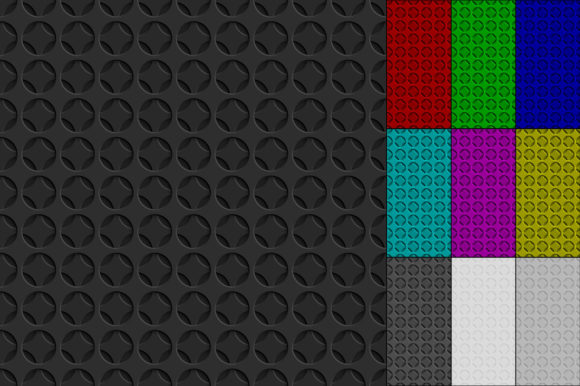
Seamless Patterns with Holes address these pain points directly. The abstract circle-hole motif is inherently neutral and modern, which means it pairs well with typography, photography, and illustrations. Because the patterns are seamless, you can tile them endlessly without visible seams, making them suitable for website backgrounds, product wraps, or fabric designs. The variety of color backgrounds—red, green, blue, purple, yellow, gray, black, and white—means you are not locked into one palette. Instead, you can choose a base that complements your brand or project theme without needing to recolor everything manually.
Another common challenge is file format compatibility. If you have ever received a design asset that doesn't open in your software or loses quality when scaled, you know how frustrating that can be. This pack solves that by offering both editable vector files (AI and EPS) and high-resolution raster files (JPG at 4167×4167 pixels). This dual-format approach ensures that whether you are working in Adobe Illustrator, Affinity Designer, CorelDRAW, or even a simpler application like Canva or Photoshop, you have a version that fits your workflow.
Practical Applications Across Different User Needs
One of the strongest advantages of Seamless Patterns with Holes is how differently each user can apply them. A web designer might use the pattern as a subtle hero section background, while a brand designer could incorporate it into packaging or business cards. Let's explore a few scenarios to illustrate how these patterns meet real-world needs.
Graphic Designers and Brand Identity
If you are developing a brand identity, consistency is key. The same pattern used across a website, social media templates, stationery, and product packaging can create a cohesive visual language. The circle-hole pattern adds texture without overpowering your brand colors or logo. For a tech startup, the clean circular cutouts can suggest connectivity, innovation, or a futuristic feel. For a lifestyle brand, softer colors like the purple or yellow variations can add a playful or warm touch. Because the patterns are available in vector format, you can also experiment with scaling, rotating, or layering them to create a completely custom asset that still ties back to your core visual system.
Print and Product Design
Print designers often face the challenge of creating backgrounds that look good at large sizes without becoming pixelated or repetitive in an unpleasant way. The high-resolution JPG files (4167×4167 pixels) are large enough to print at high quality for posters, banners, or product labels. The EPS and AI files give you even more freedom: you can resize them infinitely, change the hole sizes, or adjust the pattern density to suit your layout. For example, a product designer creating a line of notebooks might use the green pattern for the cover, the blue pattern for endpapers, and the white pattern for a minimalist version—all from the same pack.
Digital Content Creators and Social Media
Content creators who need frequent background updates for videos, YouTube thumbnails, Instagram stories, or blog graphics will appreciate the ready-to-use nature of these patterns. Instead of spending hours creating a new background for each post, you can select a color from the pack that matches your content theme. The seamless nature of the pattern ensures that even if you tile it across a wide banner or a square post, it looks intentional and professional. The gray and black options are particularly useful for creating moody or sophisticated backdrops that don't distract from the main subject.
Key Considerations for Choosing and Using These Patterns
While Seamless Patterns with Holes are versatile, getting the best results depends on a few practical decisions. Here are some recommendations based on common use cases.
Color Selection and Context
The pack includes backgrounds in eight colors, but don't think of them as fixed options. In vector software, you can easily recolor the background or even the holes themselves to match your exact brand palette. This makes the pack more like a starting point than a final asset. For instance, if your brand uses a specific shade of teal, you can take the blue pattern file and adjust the hue without losing any of the pattern integrity. If you are working strictly with the JPG files, consider how the existing colors interact with your other design elements. The neutral options (gray, black, white) are the safest for layering text or graphics over, while the brighter colors (red, yellow, purple) work well as accent backgrounds or for projects that need energy and contrast.
File Format and Workflow Efficiency
Having both vector and raster files gives you flexibility, but it also requires a little planning. For web use or digital mockups, the JPG files are perfectly fine and will load quickly. For print projects where scalability is important, always use the AI or EPS files so you can export at the exact resolution your printer requires. If you are using design software that doesn't support AI or EPS natively, consider converting the files to SVG or PDF as an intermediate step. The key is to avoid scaling up the JPG files beyond their native 4167×4167 pixels, as that could introduce pixelation. Stick with the vector files for any resizing beyond that.
Layering and Combining Patterns
One advanced technique that many designers overlook is layering these patterns with other textures or gradients. Because the circle-hole design is relatively sparse and geometric, it works well as a subtle overlay. For example, you can place the black pattern over a vibrant gradient and set the blend mode to "Screen" or "Overlay" in Photoshop or a similar tool. This creates a custom texture that feels both organic and structured. Similarly, you can combine two colors from the pack—say, the blue and green patterns—by using them in different sections of a layout to establish visual hierarchy or section breaks.
How Different Users Can Approach the Same Pack
The beauty of a resource like this is that it doesn't dictate a single use case. How you approach it depends largely on your skill level and project scope.
Beginners and small business owners might appreciate the plug-and-play nature of the JPG files. You can simply drop one into your design software, crop it to your canvas, and it works. There is no need to learn complex vector editing tools. This is especially useful if you are creating flyers, social media posts, or simple website headers and you want a professional look quickly.
Intermediate and advanced designers will likely gravitate toward the vector files. With these, you can break apart the pattern, edit individual circles, change the spacing, or even convert the holes into solid shapes and the background into holes (a negative-space effect). You can also combine elements from different patterns to create a multicolored, layered design that feels entirely original. The AI and EPS files give you the freedom to treat the pack as a kit of parts rather than a finished product.
Print professionals should focus on the vector files for any commercial print job. You can export at 300 DPI at any size without quality loss. The high-resolution JPGs are still useful for quick proofs or smaller print runs, but for large-format printing or items where quality is critical, vector is the way to go.
Getting the Most Out of Seamless Patterns with Holes
To maximize the value of this pack, think about the entire lifecycle of your project. Start by identifying the primary medium: is it digital, print, or both? If it's digital, the JPG files will likely cover most of your needs, especially if you are working within standard screen resolutions. If it's print, open the AI or EPS files first and decide whether you need to modify the pattern before exporting.
Consider also how you can use the patterns across multiple touchpoints. A brand might use the yellow pattern as a hero image background on the website, the white pattern as a subtle texture on business cards, and the purple pattern as a full-page background in a brochure. This kind of consistent yet varied application builds recognition and visual interest without being repetitive.
Another practical recommendation is to keep the pattern files organized in a dedicated folder with clear naming based on color and format. This saves time when you need to find a specific variation later. If you are working in a team, make sure everyone knows that the vector files are the masters and the JPGs are for quick use. This prevents accidental scaling issues or quality degradation.
The Lasting Value of a Well-Designed Pattern Pack
Seamless Patterns with Holes are more than just a set of backgrounds. They represent a flexible, time-saving solution that adapts to your workflow rather than forcing you to adapt to it. Whether you are creating one-off social graphics or building a comprehensive brand system, the combination of circle-hole motifs, multiple color options, and dual vector-raster formats gives you a solid foundation to work from. The patterns are modern enough to feel current but neutral enough to remain useful across different trends and styles.
By understanding what each file format offers and how to match the colors to your context, you can turn a simple pattern pack into a core part of your design toolkit. The result is less time spent on repetitive background creation and more time focused on the parts of your project that truly matter: your message, your audience, and your creative vision.