Why Donuts Patterns Deserve a Fresh Look in Your Design Workflow
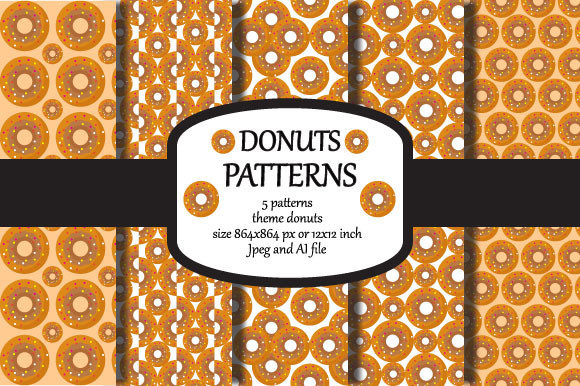
If you have ever searched for playful, scalable patterns for a packaging mockup or a wallpaper concept, you have likely stumbled across Donuts Patterns. This collection offers five distinct donut-themed designs, available in JPEG and AI files, sized at 864 x 864 pixels (12 x 12 inches). At first glance, it looks like a simple set of repeating motifs. But experienced designers know that the difference between a pattern that elevates a project and one that falls flat often comes down to how you prepare, apply, and adapt the artwork. Let's walk through the practical pitfalls that can undermine your results and, more importantly, how to sidestep them.
Treating File Format as an Afterthought
One of the most common oversights is assuming that any file format will work for any use case. Donuts Patterns includes both JPEG and AI (Illustrator 8) files, but each serves a distinct purpose. The JPEG version is excellent for quick previews, digital wallpapers, or low-stakes social media assets. However, if you plan to print these patterns on mugs, food packaging, or actual wallpaper, relying solely on a compressed JPEG can introduce artefacts, colour shifts, and limited scalability.
Here is where the AI file becomes essential. Adobe Illustrator 8 format offers vector-based paths for the core design elements, meaning you can scale the pattern to any size without losing sharpness. A common mistake is opening the AI file and assuming every element is fully editable vector artwork. In some cases, parts of the design may be raster images embedded within the vector file. Always zoom in to inspect edges and contours before committing to a large print run.
Better approach: Use the JPEG for quick mockups and digital drafts. For any production-level work, open the AI file, verify that the vector components are truly vector, and then export a high-resolution PNG or TIFF from that source. This preserves the crisp, clean lines that donut-themed patterns rely on for their visual charm.
Ignoring Tile Seams and Repeat Accuracy
Wallpaper and surface pattern design depend heavily on seamless repetition. Even a well-designed collection like Donuts Patterns can look amateurish if the repeat is not handled correctly. Many beginners assume that simply placing the pattern on a large canvas will produce a flawless tile. They are then frustrated when visible seams appear at the edges of each repeat.
This problem usually stems from one of two mistakes: either the pattern file itself has slight alignment gaps, or the software settings are misconfigured. Because Donuts Patterns is delivered as a 12 x 12 inch tile, it is designed to repeat cleanly when applied correctly. However, if you stretch, skew, or alter the aspect ratio during import, those seams become glaring.
To avoid this, always apply the pattern as a fill in your design software rather than manually duplicating the image. In Adobe Illustrator, use the Swatch Panel to create a pattern swatch from the imported file. In Photoshop, use the Pattern Stamp tool or define a custom pattern. Test the repeat on a large canvas at 100% zoom before finalising any project.
Overlooking Colour Management for Print
Another area where creators lose quality is colour handling. Donuts Patterns arrives as a JPEG (typically sRGB) and an AI file (which may contain CMYK or RGB colour spaces depending on how it was saved). If you grab the JPEG and send it directly to a printer, you might be disappointed by dull pinks or muted icing colours that looked vibrant on screen.
The misunderstanding is that screen brightness does not equal ink brightness. Printers expect CMYK or at least a properly converted colour profile. When you work with the AI file, you have the opportunity to assign a CMYK profile that matches your print provider's specifications. For packaging jobs, this step is non-negotiable. For personal projects like printed wallpaper for a kitchen or home office, it still makes a visible difference in the perceived sweetness of the donut illustrations.
Take the extra minute to soft-proof your file. If you see a warning about out-of-gamut colours, adjust the saturation of key tones like the pink frosting or chocolate drizzle before printing. Your final product will thank you.
Assuming Five Designs Cover Every Application
Donuts Patterns includes five distinct designs. That is a versatile starting point, but some buyers make the mistake of thinking these five patterns should work universally across all surfaces and scales. A pattern that looks delightful on a coffee mug might feel overwhelming as a full wall mural, and vice versa. Each design has an inherent density, scale, and colour balance that suits certain contexts better than others.
Rather than forcing a single favourite pattern into every project, evaluate each of the five designs individually. Ask yourself: does this pattern work as an all-over print for packaging, or would it be better as a decorative band on a product? Does the colour palette complement the brand identity, or does it clash? One design might feature large, spaced-out donuts that work beautifully on a notebook cover, while another might use dense, clustered donuts better suited for a small accent wall.
Matching pattern scale to surface size is an often-missed detail. A pattern that repeats every two inches might look chaotic on a business card but perfect on a tote bag. Experiment with rotating, resizing, or even combining elements from different designs within the AI file to create a custom variant that fits your specific need. The vector format gives you that flexibility if you take advantage of it.
Neglecting to Check Resolution for Specific Outputs
The 864 x 864 pixel size is clearly stated, yet many creators skip the simple step of calculating whether that resolution meets their output requirements. For digital wallpaper on a phone or desktop, 864 pixels is usually sufficient. For printing on a mug or small package, it can also work well if the print area is limited. But for large-format wallpaper covering an entire wall, that same file might produce visible pixelation when scaled up.
The moment you enlarge the JPEG beyond its intended dimensions, you lose detail. The AI file is your rescue here, because vector elements can be exported at any resolution. If you need a wall-sized pattern, open the AI file, check which components are truly vector, set your export resolution to 300 DPI at your final print size, and generate a raster file from that vector base. This ensures that the frosting swirls and sprinkles remain sharp even when viewed up close.
One practical tip: before buying any pattern set, get into the habit of matching the file resolution to your most demanding use case. For Donuts Patterns, the included AI file covers that high-end need, but only if you take the time to use it properly.
Using Patterns in Isolation Without Context Testing
A pattern can look flawless on a white screen but feel out of place when wrapped around a cylindrical mug or draped across a fabric sample. Many designers finalise their pattern choice without testing it on the actual product shape. This leads to awkward cuts, misaligned motifs, or colours that fight the product's base material.
Mockups are not just for client presentations. They are diagnostic tools. Place the Donuts Patterns design onto a 3D model of your mug, box, or wall section. Look for spots where the repeat hits a seam or where a large donut gets cropped awkwardly at the edge. If the pattern needs shifting, rotate it 90 degrees or offset the tile slightly. Small adjustments in positioning often transform a mediocre result into a polished, professional product.
Don't be afraid to experiment with scale within the mockup tool. Sometimes reducing a pattern to 75% of its original size makes it feel more sophisticated and less busy. The five designs give you room to play, so use that creative freedom.
Underestimating the Value of Consistent Branding
Entrepreneurs and small business owners sometimes treat pattern collections as mere decorative extras rather than integral brand assets. Using Donuts Patterns on packaging or marketing materials can work beautifully, but only if the style aligns with your overall visual identity. A whimsical donut pattern might be perfect for a boutique bakery, a children's party supply shop, or a lifestyle brand that uses retro food imagery. It would feel out of place for a corporate wellness brand or a high-end chocolate company that uses minimalist design.
Before incorporating the patterns, compare them against your existing logo, colour palette, and typography. If the donut illustrations lean heavily on pastel pinks and yellows, ensure those tones complement rather than compete with your brand colours. Small adjustments in the AI file can tweak hues or remove certain elements to create a cohesive look. Consistency across your product line builds recognition and trust with your audience.
Practical Steps Before You Download or Buy
If you are considering Donuts Patterns for a project, here is a quick checklist that will save you time and frustration:
- Open the AI file and verify which elements are vector versus raster. Test scaling at 200% to see if edges remain crisp.
- Create a seamless repeat test in your design software before committing to a final layout.
- Convert colours to CMYK and soft-proof if the end use is printed. Keep an RGB copy for digital use.
- Match pattern scale to your specific product dimensions. A mug, a wallpaper panel, and a food package each need a different approach.
- Test the pattern on a mockup of your actual product, paying attention to seams, alignment, and cropping.
Patterns like these are meant to bring joy and visual interest to your work, but they deliver best when handled with intention. The inclusion of both JPEG and AI files gives you flexibility across a wide range of applications from digital wallpapers to printed mugs and packaging. However, that flexibility only translates into quality when you understand the strengths and limits of each format.
If you found this breakdown useful, consider following for more practical design advice. New pattern collections and updates are shared regularly, and staying connected means you will be among the first to know when fresh themes become available. You can also find links to social media profiles in the seller's shop or portfolio page for behind-the-scenes content and additional tips. Thank you for reading, and here is to creating work that looks as good in print as it does in your imagination.