10 Mosaic Tiles Seamless Patterns
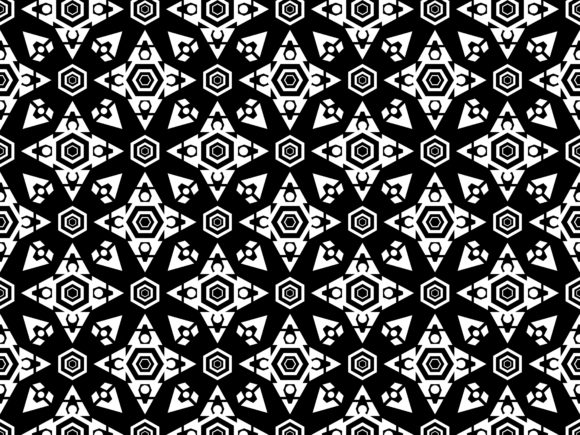
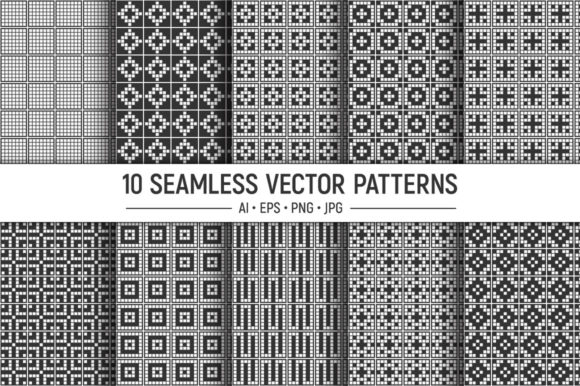
A well-designed seamless pattern does more than fill space—it sets a mood, defines a brand, and turns ordinary surfaces into something memorable. The 10 Mosaic Tiles Seamless Patterns collection delivers exactly that kind of utility. Built around geometric vector backgrounds, repeating tiny squares, and monochrome precision, this set gives designers, marketers, and small business owners a ready-made library of tileable textures that work across print, web, and product design.
Each pattern in the collection is fully seamless, edited, and repeated so edges disappear and the surface flows without interruption. Whether you are creating wrapping paper, fabric prints, banners, business cards, or social media backdrops, these files remove the guesswork from pattern creation. You get ten distinct designs, each with its own AI, EPS, JPG, and PNG files, all at 3600x3600 pixels and 300 dpi. That resolution means crisp output for both digital screens and commercial print.
What Makes a Mosaic Tile Pattern Valuable for Creators
Mosaic tile patterns have a long history in architecture and art, but their modern digital versions offer something different: repeatability at scale. The tiny squares that form these designs create a rhythmic, almost meditative visual texture. They work well in both minimalist and complex layouts because the grid structure provides order without feeling rigid.
For a designer working on a brand identity, these patterns can act as secondary visuals that reinforce a clean, structured aesthetic. For a hobbyist making printable paper packs, they offer instant production-ready material. The monochrome palette especially suits contemporary branding, where black and white or subtle grayscale tones communicate sophistication and clarity. The collection includes vector files so you can scale any pattern infinitely, change colors, isolate elements, or combine motifs without losing quality.
Practical Applications Across Different Projects
One of the strongest arguments for owning a dedicated pattern set is time. Creating seamless tileable textures from scratch takes patience, precision, and often multiple attempts. With these files, you skip the trial phase and move directly to application. Here are several realistic ways different users can put the 10 Mosaic Tiles Seamless Patterns to work.
Surface Design and Fabric Printing
Fabric design demands patterns that repeat without visible seams. Whether you are creating custom upholstery, pillow covers, or scarves, a seamless tile ensures the design flows across the entire yardage. The 300 dpi PNG files are print-ready, so you can upload them directly to fabric printing services. The vector EPS and AI files give you the option to scale the pattern to fit different fabric widths. Because the patterns are built from tiny squares, they retain detail even when printed at small scales, making them ideal for intricate textile work.
Packaging and Wrapping Paper
Small business owners and product designers often need distinctive packaging that stands out on a shelf. A monochrome mosaic pattern printed on matte or kraft paper creates a premium unboxing experience without the cost of custom illustration. You can use the JPG files for quick mockups or the vector files to adjust the pattern scale so it wraps perfectly around boxes, tubes, or bags. The included pattern swatches for Adobe Illustrator make it easy to apply the design as a fill to any shape, saving time when packaging prototypes go through multiple revisions.
Web and Digital Backdrops
Bloggers, marketers, and web designers need backgrounds that load fast and look clean at any screen size. The 3600x3600 pixel PNG files provide enough resolution for full-screen hero sections without pixelation. Because the patterns are monochrome and geometric, they do not compete with foreground content like headlines, product photos, or call-to-action buttons. A subtle mosaic tile behind a text block adds visual depth while keeping readability high. You can also use the AI files to export smaller web-optimized versions, ensuring fast page load times.
Business Cards and Stationery
Freelancers and small business owners often want business cards that feel designed without being overdone. A seamless mosaic pattern used as a background or border on a business card gives it texture and personality. The vector format lets you adjust the pattern density so it works on a small canvas. Print shops typically request artwork at 300 dpi, and these files meet that requirement out of the box. The same applies to letterheads, folders, notepads, and branded envelopes. The pattern swatches mean you can keep your stationery consistent across all pieces without manually repeating the design.
Posters and Wall Art
Poster design benefits from patterns that fill space without looking like filler. A mosaic tile background can anchor a typographic poster or provide texture behind an illustration. Because the collection includes ten different patterns, you can choose a tighter grid for a technical feel or a looser arrangement for a more organic look. The monochrome palette also makes it straightforward to overlay colored text or graphics. If you plan to sell digital prints or printable wall art, the high-resolution JPG files give customers immediate access to a finished design.
How to Keep Results Clear and Audience-Friendly
Patterns are powerful tools, but they can overwhelm a layout if not applied thoughtfully. Here are practical guidelines to ensure your mosaic tiles enhance rather than distract.
- Match scale to medium. A pattern that works beautifully on a poster may feel too dense on a business card. Use the vector files to scale the pattern up or down so the tile size fits the physical dimensions of your project.
- Consider contrast. Monochrome patterns rely on value differences. Test your chosen pattern against the foreground elements. If the pattern is too busy, reduce its opacity or choose one with a more open grid.
- Use pattern swatches for consistency. The AI and EPS files include swatches that let you apply the pattern as a fill across multiple artboards. This keeps alignment consistent and eliminates manual placement errors.
- Limit patterns to one per composition. Mixing multiple mosaic tiles in the same project can create visual noise. Pick one pattern as the anchor and use solid colors or simple shapes for secondary elements.
- Save original files separately. Each pattern comes in its own folder with all formats included. Keep the AI and EPS files untouched so you can return to the original design if a project needs scaling or recoloring later.
How Different Audiences Can Adapt the Set
The strength of this collection lies in its versatility. Different users will prioritize different aspects of the files based on their workflow.
Graphic designers will appreciate the vector formats and swatch panels. Being able to recolor a pattern without losing the tile structure opens up endless variations. If you need a warm gray instead of pure black, you can adjust the entire set in minutes. Designers working on branding projects can create locked-up logo systems where the pattern serves as a secondary brand element across social media templates, email headers, and printed collateral.
Print-on-demand sellers need files that meet platform requirements without extra editing. The 300 dpi JPG and PNG files are ready for upload to print-on-demand services for phone cases, tote bags, mugs, and pillows. The 3600x3600 pixel size covers most product templates in one file. Because the patterns are seamless, you do not have to worry about visible repeat lines on curved surfaces.
Educators and content creators can use the patterns as teaching tools. Show students how geometric grids form the foundation of pattern design, or use the tiles as backgrounds for instructional videos. The clean monochrome look keeps the focus on the content while adding a professional finish.
Hobbyists and DIY enthusiasts get immediate access to printable paper packs for scrapbooking, card making, and home decor. The PNG files can be printed on standard home printers at 300 dpi for crisp results. Use them as book cover wraps, drawer liners, or gift tags.
Technical Quality and File Organization
A pattern set is only useful if you can find and open the right file quickly. This collection organizes each pattern in a separate folder containing all four formats. The AI and EPS files include the pattern swatches in the swatch panel, so you do not need to rebuild the tile manually. The JPG and PNG files are named clearly for easy identification. If you work across different software, having both AI and EPS ensures compatibility with older and newer versions of Adobe Illustrator, as well as other vector editing programs. The all-in-one AI and EPS files contain all ten patterns in a single document, which is helpful when you want to compare designs side by side before committing to one.
Final Recommendations for Getting the Most Out of This Collection
Start by opening the all-in-one AI file to preview all ten patterns. Identify the ones that match the tone of your current project. Export the specific pattern folder with the formats you need. For digital use, the PNG files offer transparency so you can layer the pattern over colored backgrounds. For print, use the JPG or vector files depending on whether you need a raster or scalable output.
If you are designing for a client, present two or three pattern options so they can see how different grid densities affect the overall feel. Because the patterns are monochrome, they work well as a neutral base that clients can approve quickly before you layer in brand colors. Store the vector files in your design library so they are accessible for future projects. A well-organized pattern collection pays for itself every time you bypass the tedious process of building tiles from scratch.
The 10 Mosaic Tiles Seamless Patterns set bridges the gap between creative ambition and practical execution. Whether you are launching a product line, refreshing a brand identity, or simply exploring geometric design, these files give you a reliable foundation. The seamless repeats, high resolution, and multi-format delivery ensure that your work looks intentional and polished, no matter where the pattern ends up.